
Plans
Licenses assigned to machines, with duration and permissions.
A plan is a license assigned to each machine: it decides what users can do with the machine and until when.
Open Admin › Admin › Plans.
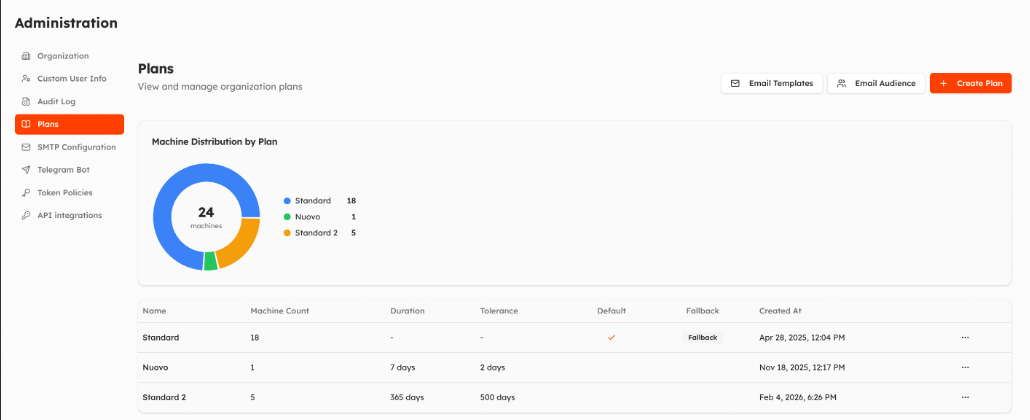
The page shows how many machines are on each plan and the list of plans: name, number of machines, duration, tolerance, default and fallback.
Create a plan
Create Plan:
- Name.
- Duration in days (empty = no expiry) and Tolerance: days after the expiration before the machine moves to the fallback plan.
- Plan Permissions: what the plan allows on its machines (view, manage, delete, change group, firmware, commands, recipes, certificates, configuration). The plan limits what can be done on its machines, whatever the users' roles.
From the menu of each plan: Edit, Set as Default (the plan of new machines) and Set as Fallback (the plan machines go to when theirs expires; only plans without a duration).
Assign plans to machines
- On a machine: ⋮ › Change plan.
- On many machines: Change Plan in the machine list.
Choose the plan, the start date and the expiration date (proposed from the plan duration).
Emails
- Email Templates: emails sent on plan activation, before expiration (how many days before), at expiration and when a user requests a plan change. Each email is off until you turn it on; you can edit subject and text.
- Email Audience: who receives them: organization administrators, users who can see the machine, specific users.
Updated about 2 hours ago