Commands and monitoring view
Define commands and the default monitoring view of a firmware.
The Monitoring tab of a firmware version defines what users see in the Monitoring tab of the machines running it.
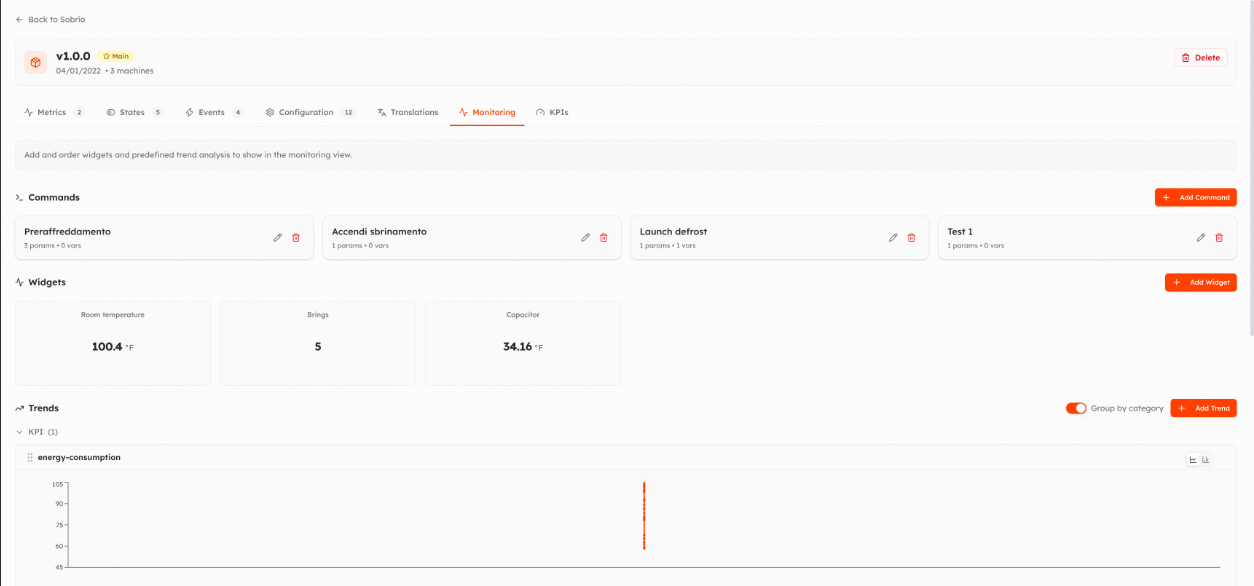
Commands
A command sends a predefined set of parameter values to the machine with one click (for example Start defrost).
Add Command:
- Command Name.
- Parameters: the parameters to write, each with its Default Value. With Override users can change the value before sending it.
- Monitored Variables: values shown next to the command button, to see its effect.
Command parameters are visible to everyone who can see the machine. Executing a command requires the Execute commands permission.
Widgets and trends
- Add Widget: the live values shown at the top of the Monitoring tab.
- Add Trend: the charts shown by default.
Users can change their view on each machine; Reset View brings back the one defined here.
Video
Watch the video on YouTube. It shows the previous version of the interface: an updated video is coming.
Updated 9 days ago