
Parameters
Read and write the configuration parameters of a machine.
The Configuration tab reads the parameters from the machine and lets you change them. The machine must be online.
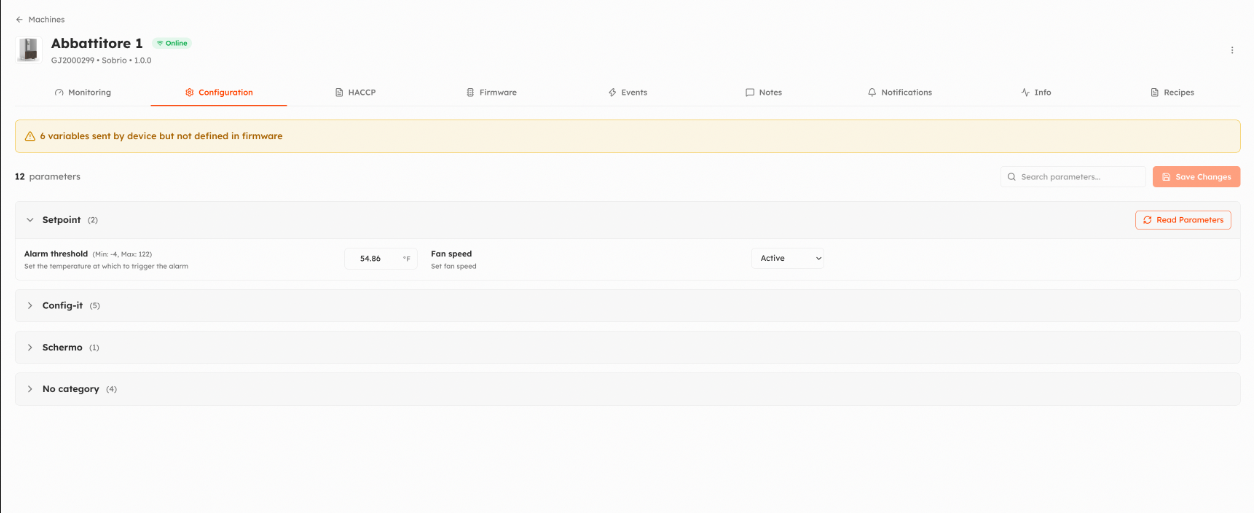
- Open the tab: Things5 reads the current values from the machine. Parameters are grouped by category; use Search parameters to find one.
- Change the values you need. Minimum, maximum and type are checked.
- Click Save Changes and confirm: the new values are written on the machine.
Read Parameters reads the values of a category again.
- Which parameters you can see and change depends on your role: each parameter has an access level (1 to 5) and roles can hide, read or write each level, see Roles and permissions.
- Some models read only the parameters you open, or write only the ones you changed: see Parameter options.
- Organization administrators also see a warning when the machine sends variables that are not defined in its firmware, or the other way around.
To write the same values on many machines at once, use Write Parameters in the machine list.
Video
Watch the video on YouTube. It shows the previous version of the interface: an updated video is coming.
Updated 9 days ago