
Data exports
Export the data of a machine to Excel or CSV.
Available if enabled for your organization.
Request an export
From the machine menu choose ⋮ › Export data.
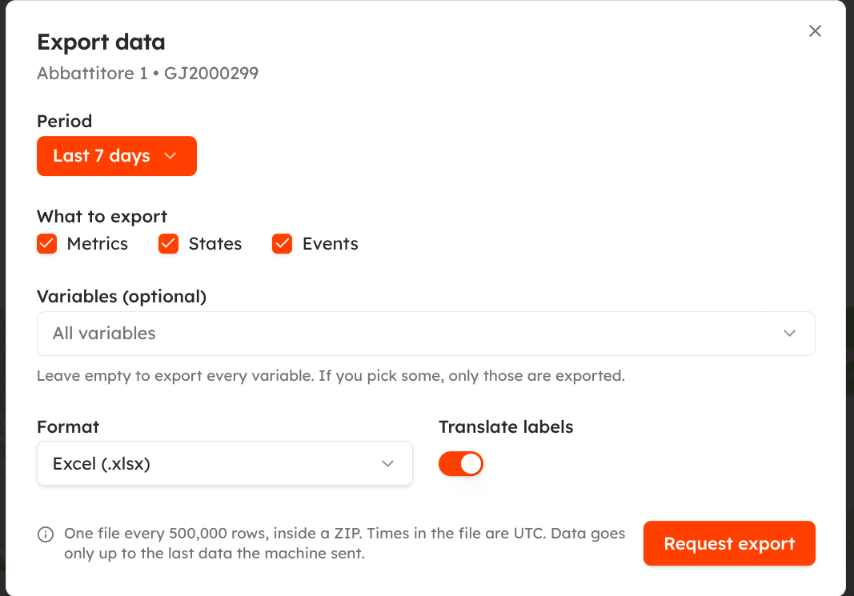
| Field | Notes |
|---|---|
| Period | The time range to export. |
| What to export | Metrics, States, Events. |
| Variables | Optional: leave empty to export every variable. |
| Format | Excel (.xlsx) or CSV. |
| Translate labels | Use the variable labels in your language instead of their names. |
Click Request export. The export runs in the background and you receive an email when it is ready. The file is a ZIP with one file every 500,000 rows; times are in UTC.
Download
Open Machines › Data exports: the list shows your exports of the last 7 days with machine, period, format and status (queued, in progress, ready, failed). Click Download when it is ready. If an export fails, the reason is shown (for example too many rows, or no data in the period).
The same export is available through the API, see Request a data export.
Updated about 2 hours ago