
Users
Invite users and give them access to machines.
Open Admin › Users. The page is available to users who can view or manage users.
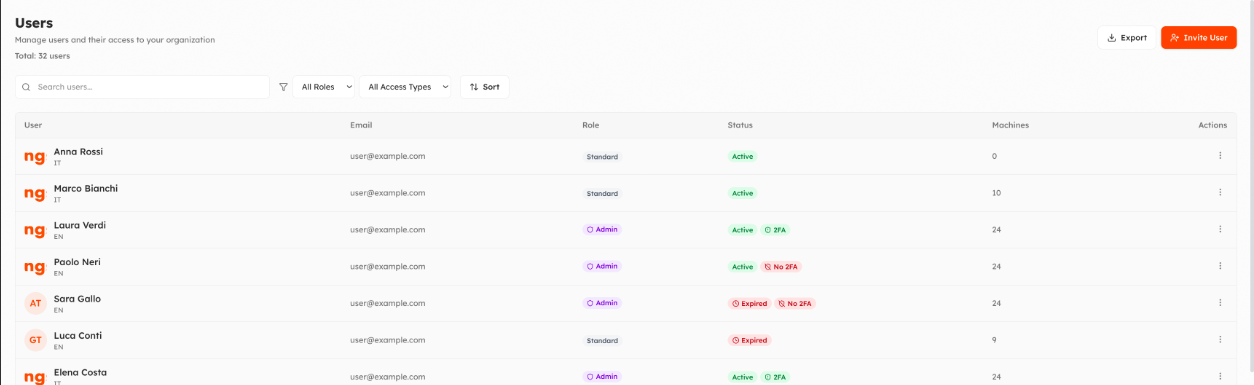
The list shows each user's role (Admin or Standard), status (active, pending invitation, expired invitation), how many machines they can access, and badges for two-factor authentication and for the old username-and-password API access. You can search, filter (role, access type, 2FA), sort and Export the list to CSV or Excel.
Invite a user
Invite User:
- User Info: user type Standard or Admin, whether two-factor authentication is required (always for administrators), email, first and last name, language. The user receives an invitation email.
- Groups: choose the groups the user can access and the role on each (see Groups and sharing and Roles and permissions). You can skip this step and do it later.
The user page
Click a user to:
- edit name and language, Reset Password, see when they were created and last logged in;
- Make admin or Make standard;
- manage Machine Groups Access (add or remove a group with a role) and see the machines shared directly with them;
- turn on Global notifications for new users and new machines;
- Delete the user.
Admins and standard users
- Admins can do everything in the organization, including the Admin section.
- Standard users can do what their roles allow, on the groups where they have a role and on the machines shared with them.
For software that calls the API (stations, integrations) do not create users: use API integrations.
Video
Watch the video on YouTube. It shows the previous version of the interface: an updated video is coming.
Updated 2 days ago