
Organization settings
Branding, dashboard links, custom fields for users, email, Telegram and audit log.
Organization administrators open Admin › Admin. The Administration page has these sections:
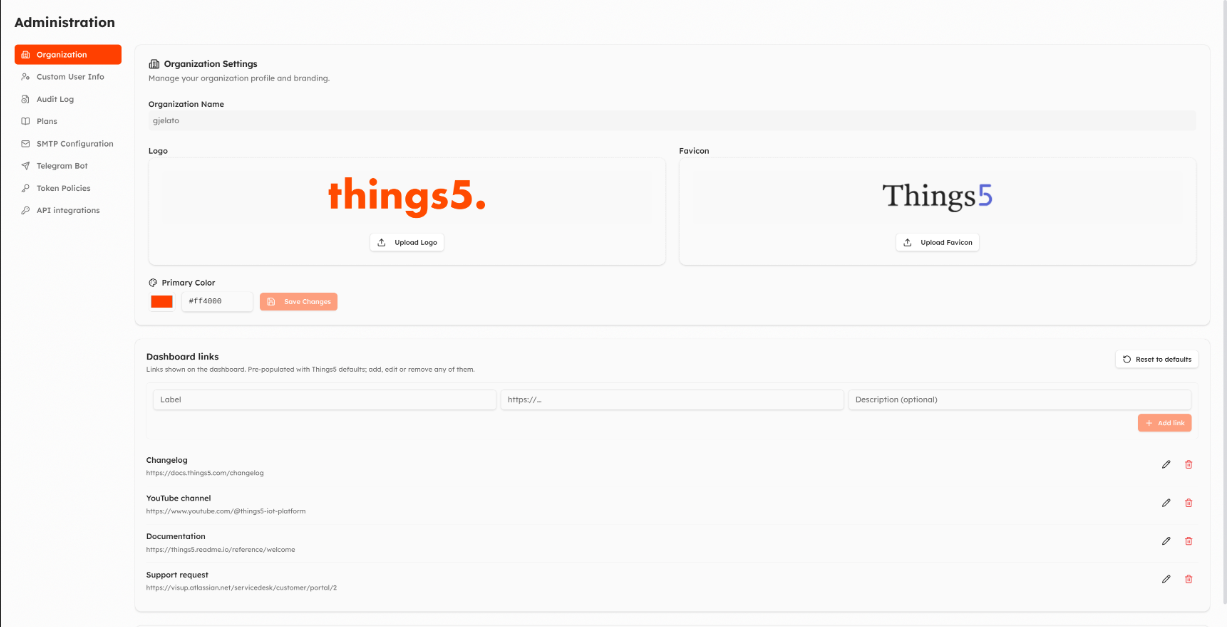
Organization
- Organization Settings: name, Logo, Favicon and Primary Color of the interface.
- Dashboard links: the quick links shown on the Dashboard (label, address, description). Reset to defaults restores the default Things5 links.
- Machine menu items: your own links in the machine ⋮ menu, for example to your service portal. The address can contain placeholders (
{{deviceId}},{{userId}},{{organizationId}},{{realm}},{{roleId}}), the title can be translated, and the link can be shown on all machines, only for some models or only for some roles.
Custom User Info
Fields that users must fill in after login, shown in their profile: text, number, yes/no, list, or a document to accept (for example terms of service or a privacy notice, uploaded per language, with a version). When you publish a new version of a document, users are asked to accept it again. Live Preview shows what users will see.
Audit Log
Who changed what and when, with filters by event type, user and period. View Details shows the old and new values.
Plans
See Plans.
SMTP Configuration
Send Things5 emails to your users from your own mail server: host, port, TLS or STARTTLS, username and password, sender address and name. Send test email checks the settings.
Telegram Bot
Username and token of your organization's Telegram bot (created with BotFather). Required for your users' Telegram notifications.
Token Policies and API integrations
See Device tokens and API integrations.
Data Usage
Admin › Data Usage shows, for each machine, how many data points it sent (metrics, states, events), with export to Excel.
Updated about 2 hours ago